📌 Key Takeaways
- •A shell: the screen back cover, the LCD top cover, the outward face when the laptop is closed.
- •B shell: the screen bezel, the frame around the LCD screen.
- •C shell: the palmrest, the top cover of the base around the keyboard, the operating face that holds the keyboard and touchpad area.
- •D shell: the bottom cover, the underside of the base.
How the hinge is fixed: A / B / C / D shell relationships
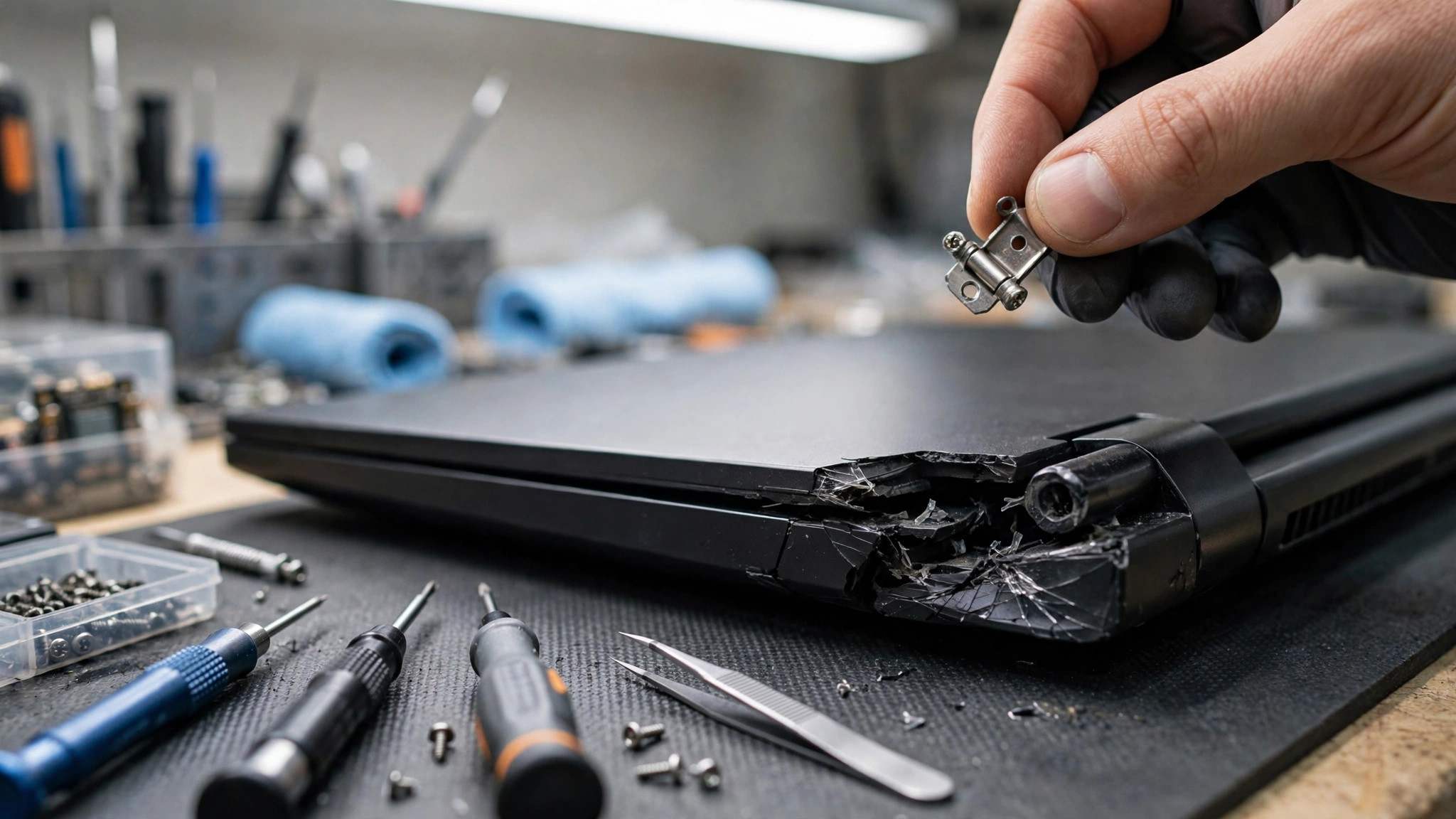
A laptop hinge is a metal part that connects the display assembly to the base and lets the lid open and close. It uses friction to provide damping, so the screen can stay at different angles. The hinge is fixed on one side to the screen side, the A shell, and on the other side to the body side, the C shell or the D shell, depending on the model design.
- A shell: the screen back cover, the LCD top cover, the outward face when the laptop is closed.
- B shell: the screen bezel, the frame around the LCD screen.
- C shell: the palmrest, the top cover of the base around the keyboard, the operating face that holds the keyboard and touchpad area.
- D shell: the bottom cover, the underside of the base.
Symptom comparison table
| Symptom | More likely direction | What to do |
|---|---|---|
| Cracking or crunching sound when opening or closing | Plastic fixing point cracked or hinge cracked, high urgency | Stop opening and closing at once, arrange an inspection |
| Screen tilts to one side, lid does not line up | One hinge already broken, the other still taking load, high urgency | Stop opening and closing at once, arrange an inspection |
| Palmrest or bezel cracked near the hinge | Hinge already detached from the body fixing point, high urgency | Stop opening and closing at once, arrange an inspection |
| Screen flickers when opening or closing | Display cable may be damaged, high urgency | Stop opening and closing at once, arrange an inspection |
| Opening feels much tighter or much looser than before, screen will not stay at an angle | Hinge damping or fixing point problem | Arrange an inspection, do not force it |
| Shell lifts slightly when opening, frame clips separate, keyboard face is pushed up | Bottom screw seat already broken, shell being pushed outward by the hinge | Arrange an inspection, do not keep opening and closing |
| Visible crack near the hinge | Damage already beyond just tightening screws | Arrange an inspection, do not keep using it as normal |
Causes
- One-handed opening from a corner. Opening from one corner of the screen puts uneven force on the two hinges. Most laptops use two hinges working in balance. Opening from a corner breaks that balance and puts the full twisting load on one side, so one side usually fails first. Opening from the centre of the lid with even force lets both hinges share the load.
- Screws loosening. Repeated opening and closing can slowly loosen screws.
- Over-tightening screws. Over-tightening can strip the thread.
- Drop or impact, or excessive force when opening. A drop, a knock, or forcing the lid open can crack the hinge fixing seat or bend the metal part. An impact can crack an internal fixing point even when the outside shows no obvious damage, and the damage then gets worse with each opening.
- Heavy pressure. Placing heavy objects on the lid, putting the laptop in a bag together with books, or pressing weight down on the machine can overload the hinge and can even crack the screen.
- Dust, heat and humidity, and plastic ageing. Dust build-up in the hinge mechanism increases friction and can cause squeaking or stiffness. Long exposure to heat or humidity can make materials fatigue and affect hinge strength and performance.
- Thin and light, narrow-bezel entry-level or mid-range consumer models. Some light, narrow-bezel entry-level or mid-range consumer laptops have a weaker hinge structure or shell material, and the chance of damage over long use is higher. Business models or higher-end gaming models usually have stronger structure and materials.
- Chain damage. After one fixing point breaks, the stress from repeated opening is taken by the remaining screws and fixing seats, so they are more likely to break in turn.
DIY risks
- Super glue is not a structural repair. Super glue turns brittle, can seep into places it should not go, or fog nearby plastic, and generally cannot bear the repeated load of opening and closing the display. Do not use it on a cracked hinge fixing seat, especially a plastic hinge fixing boss or screw post.
- Glue in general is at most a temporary cover, not a real repair. A small amount of adhesive can at most limit movement for a short time and seldom restore structural strength. Glue can also stick together parts that a technician later needs to separate, making the real repair harder, and can leave residue. Do not apply adhesive near electronic parts or moving hinge parts.
- Glue seeping into the screen layer or onto the motherboard can directly cause the laptop to be scrapped. High-flow chemical glue that seeps into the screen layer or flows onto the motherboard can cause damage that cannot be put right. This is one reason DIY gluing is not recommended.
- Prying the B shell bezel with the wrong force can crush the LCD panel on the spot. The bezel has to be opened with care. The wrong force can press straight onto the panel.
- Over-tightening screws strips threads. Tighten lightly and do not over-tighten.
- Wrong hinge part. Laptop hinges are model-specific. Even within the same product series, the hinge can differ by screen size or production year. Check the exact part number before ordering, or you may end up with the wrong part.
- Do not force a stiff hinge open. If the hinge is jammed or abnormally stiff, do not force the lid open. Forcing it only speeds up the damage.
- Before any disassembly, back up important files, switch off, unplug the charger, and disconnect the battery if it can be removed. Record or organise screw positions, because screws in different positions must go back to their original places.
- If a screw is stripped or spins freely, stop at once. If damage is already visible, arrange an inspection instead of pushing on.
What happens if you leave it
Need a laptop repair expert?
Free diagnosis · Transparent pricing · No fix, no fee · 180-day warranty
- The display cable and Wi-Fi antenna are pulled. The display cable and Wi-Fi antenna pass near the hinge between the body and the display. When the hinge is broken or out of position, each opening pulls these thin cables. The result can be flickering, abnormal display, or a fully black screen. If the lid keeps being opened and closed, a small repair can turn into a combined repair covering the hinge, the shell, the cable and the screen.
- The panel can crack. Damage to the hinge can put enough pressure on the panel to crack the screen.
- Shell cracks spread and the lid can separate. A crack near the hinge can spread. If opening and closing continues, the lid can separate from the body. A visible crack near the hinge already means the damage is beyond just tightening screws.
- The longer you wait, the larger the repair tends to become. A loose screw is a small repair. A damaged display cable is not. Early handling is generally simpler and lower cost than letting the problem become a combined hinge, shell, cable and screen repair. The actual outcome depends on inspection.
Repair options comparison table
| Option | When it fits | What to note |
|---|---|---|
| Tighten screws / adjust hinge damping | Screws simply loosened and the fixing point is still intact; hinge too tight | Tighten lightly, do not over-tighten or the thread will strip. Adjust to a balance point where the screen stays put without overloading the fixing point |
| Hinge replacement | Hinge itself bent or broken apart | If the surrounding plastic is cracked, missing or detached, replacing the metal hinge alone usually fails again. The damaged shell or bracket must also be dealt with |
| Screw post rebuild / structural reinforcement | Fixing point cracked but the shell is not severely deformed | Rebuild the fixing point inside the original shell with epoxy resin, plastic repair putty or a metal stud implant, and adjust the hinge damping to a balance point. Keep adhesive away from the hinge pivot, display cable, screw threads and vents, reduce hinge load, and let the adhesive fully cure before refitting the hinge |
| A / C shell replacement | Fixing bosses or screw posts damaged over a wide area, plastic severely deformed, or repair material cannot hold the screws firmly | The factory approach usually does no structural reinforcement: when a lock point is broken or the shell is cracked, the whole assembly is replaced, for example a broken A shell lock point means replacing the whole new A shell assembly |
| Cable check / cable replacement | Cable already worn or pulled | During repair, check the cable for wear. If the cable is damaged, it needs to be dealt with together with the hinge and shell, not on its own |
When to send it for repair
Arrange an inspection instead of continuing to open and close the lid if any of these apply:
- Cracking or crunching sound when opening or closing.
- Screen flickers when opening or closing.
- Lid tilts to one side or does not line up.
- Palmrest or bezel cracked near the hinge.
- Visible crack near the hinge.
- Hinge already separated from the shell.
- Shell lifts when opening, frame clips separate, or keyboard face is pushed up.
- Hinge abnormally stiff or jammed.
Before sending it in:
- Back up important files.
- Write down the symptoms, for example when the sound started, which side it comes from, and whether the screen flickers.
- Write down the laptop brand and model and the serial number. A clear fault description helps the engineer diagnose faster.
- Do not keep opening and closing the lid to re-test it.
Daily habits that reduce hinge stress
- Open and close from the centre of the lid with even force. Use both hands, or one hand applying even force from the centre, so both hinges share the load. Do not open from a corner with one hand.
- Do not lift the machine by the screen. When carrying the laptop, support the base on both sides. Lifting by the screen pulls the hinge joints.
- Do not put heavy objects on the lid. When putting the laptop in a bag, make sure there is enough cushioning and avoid direct impact. Do not put the laptop in a bag together with books pressing on it.
- Do not open beyond the designed maximum angle. Once the lid is fully open, do not push it further back.
- Do not slam the lid. Close gently with even force and let the lid settle slowly, so the fragile fixing seats are not hit with impact load.
- Do not open or close the laptop while moving. Shaking in an unstable environment puts abnormal force on the hinge.
- Check the screws from time to time. Hold the base firm and gently shake the top corners of the screen. If there is obvious movement, the screws need checking.
- Clean dust from the hinge gap from time to time. Dust build-up in the hinge area affects hinge function.
- Use the laptop on a stable, flat surface.
Pricing: the only prices we can state here
| Item | Price |
|---|---|
| Battery | HK$580 up |
| Screen | HK$1,280 up |
| Main board chip-level | HK$880 up |
| Keyboard | HK$480 up |
| Hinge / A / C shell repair | Quoted in writing after inspection |
| Cable replacement | Quoted in writing after inspection |
FAQ
Q1: There is a crack but the laptop still works. Can I keep using it?
A1: It is not recommended to keep using it as normal. A visible crack near the hinge already means the damage is beyond just tightening screws. Each extra opening can pull the display cable, spread the shell crack, or crack the panel. Stop opening and closing the lid and arrange an inspection. Back up important files first.
Q2: Can I just glue it back myself?
A2: It is not recommended. Super glue turns brittle, can seep into places it should not go, or fog nearby plastic, and generally cannot bear the repeated load of opening and closing. Glue can also stick together parts a technician later needs to separate, making the real repair harder. If glue seeps into the screen layer or onto the motherboard, it can directly cause the laptop to be scrapped. To be confirmed by inspection, the right fix depends on whether the fixing point can be rebuilt or the shell must be replaced.
Q3: Will replacing the hinge alone fix it?
A3: Not always. If the fixing seat is already damaged and has come away from the shell, replacing the hinge alone will usually fail again, because the new hinge has nothing solid to fix to. The damaged A shell or C shell must be dealt with together, or the hinge will loosen again. Inspection is needed to judge whether the fixing point can be rebuilt or the shell must be replaced.
Q4: How much does hinge repair cost?
A4: Hinge and A / C shell repair prices are quoted in writing after inspection. The actual scope depends on inspection: whether it is loose screws, a bent hinge, a cracked fixing point, or a shell that must be replaced, and whether the cable is also damaged. Book a check through diagnostic to get a written quote for your exact model.
Need Professional Laptop Repair?
Laptop King has 15+ years of repair experience in Shek Mun, Sha Tin. Free diagnosis, transparent pricing, no fix no fee. 180-day warranty for your peace of mind.